

Creating a successful classified ads website on WordPress requires the right combination of plugins to enhance functionality, user experience, and monetization. In this guide, we’ll explore eight top plugins, including CozyBlocks Advertisement Block, to help you build and manage your classified ads site effectively.
Table of Contents
Why WordPress Classified Ads Plugins Are Necessary
Classified ads websites have become a popular way to buy, sell, and trade items, services, and even job listings online. However, creating and maintaining such a site on WordPress can be overwhelming without the right tools. WordPress classified ads plugins are essential for several reasons:
- Streamlined User Experience: These plugins offer built-in templates and tools that simplify the process of adding and managing classified ads. Users can easily submit, edit, and manage their ads, enhancing the overall user experience.
- Monetization: Many of these plugins come with payment gateway integrations, allowing you to monetize your site. You can charge users for posting ads, offering premium ad placement, or even setting up recurring listings.
- Customization: Classified ads plugins allow for complete customization, so you can tailor your site to suit your niche, whether it’s real estate, jobs, services, or products. You can customize ad categories, fields, and even the layout.
- SEO Optimization: SEO is crucial for any website, and classified ads plugins typically come with built-in tools that help optimize your ads for search engines. This ensures your ads are discoverable and rank well, bringing in organic traffic.
- Advanced Features: Features like ad moderation, advanced search filters, and ad expiration dates make it easier to manage your classified ads and keep the content up-to-date. This ensures your website remains relevant and high-quality.
Using the right WordPress classified ads plugin helps you build a professional, fully functional website without needing extensive coding knowledge. It simplifies both the admin and user experience, ensuring your site operates smoothly and efficiently.
How to Add Ads in WordPress
Adding ads to your WordPress site is a great way to monetize your content, whether through display ads, sponsored content, or affiliate links. Here’s how to add ads to your WordPress website effectively:
1. Using a WordPress Ads Plugin
The simplest and most effective way to add ads is by using an ads plugin. Plugins like CozyBlocks Advertisement Block, Ad Inserter, or Advanced Ads provide an easy-to-use interface for managing ads.
- Install the Plugin: Go to your WordPress dashboard, navigate to Plugins > Add New, and search for the ads plugin of your choice (e.g., Ad Inserter).
- Activate the Plugin: Once installed, activate it from the Plugins menu.
- Configure Settings: Set up your ad placements, such as where the ads will appear (e.g., in the sidebar, header, footer, or within posts).
- Insert Ad Code: With the plugin, you can insert ad scripts, such as Google AdSense or custom banner ads, directly into the areas you want them to display.
2. Manually Adding Ads in WordPress
If you prefer not to use a plugin, you can manually insert ads into your WordPress site. Here’s how:
- Add Ad Code to Widgets: Go to Appearance > Widgets, and drag a Text or HTML widget to your sidebar or footer area. Paste the ad code (from networks like Google AdSense) into the widget.
- Add Ad Code to Posts/Pages: While editing a post or page, switch to the Text editor, and paste the ad code where you want the ad to appear. This is ideal for adding ads within the content of your pages or blog posts.
3. Using Custom Ad Widgets
Many themes come with built-in custom widgets that allow you to display ads. These widgets are specifically designed to display banners, images, or text ads in designated areas like sidebars, headers, or footers.
- Go to Appearance > Customize: Many WordPress themes allow you to add custom widgets directly from the theme customization panel.
- Add Ad Widget: Look for an option to add an ad or banner widget, and insert your ad code or image.
4. Adding Ads with Gutenberg Blocks
If you’re using the Gutenberg editor, the CozyBlocks Advertisement Block plugin provides you with customizable ad blocks. You can drag and drop these blocks into your pages or posts, giving you full control over your ad placement.
Best WordPress Classified Ads Plugins
1. CozyBlocks Advertisement Block

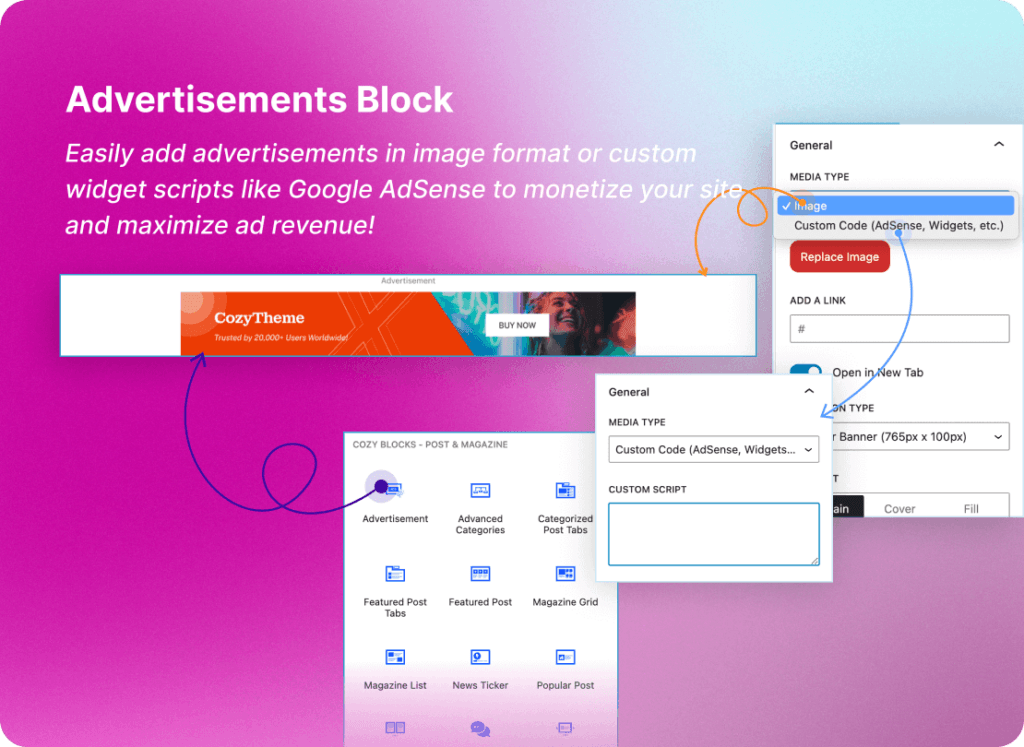
CozyBlocks is a comprehensive WordPress plugin that enhances the Gutenberg block editor by offering over 40 advanced blocks, 200+ sections, and 10+ pre-designed homepage templates. It’s designed to streamline website design and functionality, making it ideal for creating engaging classified ads pages.
Features:
- Advanced Blocks: Over 40 customizable blocks for various content types.
- Pre-Designed Sections: 200+ sections to speed up page building.
- WooCommerce Integration: 10+ blocks tailored for eCommerce sites.
- User-Friendly Interface: Drag-and-drop functionality for easy design.
Pricing:
- Free Version: Access to basic blocks and sections.
- Pro Version: $49/year for advanced features and priority support.
Link: CozyBlocks Advertisement Block
2. Directorist
Directorist is a versatile directory and classified ads plugin for WordPress, offering a user-friendly interface and extensive customization options.
Features:
- Advanced Search Filters: Enhance user experience with detailed search options.
- Monetization Options: Supports paid listings and membership plans.
- Payment Gateway Integration: Compatible with PayPal and Stripe.
- SEO Optimization: Built-in tools to improve search engine rankings.
Pricing:
- Free Version: Basic features suitable for small sites.
- Premium Version: Starts at $99/year for advanced features.
Link: Directorist
3. AWP Classifieds
AWP Classifieds (formerly Another WordPress Classifieds Plugin) is a dedicated solution for creating classified ads websites with ease.
Features:
- Ad Fee Plans: Set up various pricing plans for listings.
- Image Uploads: Allow users to add images to their ads.
- Advanced Search: Users can filter ads based on multiple criteria.
- Customizable Templates: Modify the appearance to match your site’s theme.
Pricing:
- Free Version: Core features for basic functionality.
- Premium Add-ons: Prices vary; check the website for details.
Link: AWP Classifieds
4. Business Directory Plugin
This plugin enables you to create a business directory with classified ads capabilities, offering a range of customization options.
Features:
- Customizable Listings: Add custom fields and categories.
- Payment Integration: Supports PayPal and Stripe for paid listings.
- SEO-Friendly: Optimized for search engines.
- User Reviews: Allow users to leave reviews on listings.
Pricing:
- Free Version: Basic features for small directories.
- Premium Version: Starts at $99/year for advanced features.
Link: Business Directory Plugin
5. WPAdverts
WPAdverts is a lightweight and modular plugin for creating classified ads websites, known for its ease of use and flexibility.
Features:
- Modular Design: Add features as needed with extensions.
- Responsive Layouts: Mobile-friendly design.
- Payment Integration: Supports PayPal and Stripe.
- Custom Fields: Tailor listings to your needs.
Pricing:
- Free Version: Basic functionality for small sites.
- Premium Add-ons: Prices vary; check the website for details.
Link: WPAdverts
6. Classified Listing
Classified Listing is a feature-rich plugin for creating classified ads websites, offering a range of customization options.
Features:
- Multiple Listing Types: Create various types of listings.
- Payment Integration: Supports PayPal and Stripe.
- SEO-Friendly: Optimized for search engines.
- User Dashboard: Allows users to manage their listings.
Pricing:
- Free Version: Core features for basic functionality.
- Premium Version: Starts at $49/year for advanced features.
Link: Classified Listing
7. Ad Inserter
Ad Inserter is a powerful ad management plugin for WordPress, allowing you to insert ads anywhere on your site.
Features:
- Multi-Ad Placement: Insert ads anywhere on your website, including headers, footers, and content areas.
- Ad Targeting: Choose where and when your ads appear based on page, post, or device type.
- Google AdSense Integration: Easy integration with Google AdSense for ad earnings.
- Customizable Code: Insert custom ad scripts with ease.
Pricing:
- Free Version: Core ad placement features.
- Pro Version: $22/year for additional features such as ad targeting and custom code.
Link: Ad Inserter
8. Advanced Ads
Advanced Ads is a flexible ad management plugin that helps you create and manage ads on your WordPress site, including classified ads.
Features:
- Ad Rotation: Rotate ads to maximize impressions and clicks.
- Ad Scheduling: Schedule ads to appear at specific times.
- Google AdSense Support: Easily integrate Google AdSense with your site.
- Responsive Ads: Automatically adjust ads for different devices.
Pricing:
- Free Version: Basic ad management features.
- Pro Version: Starts at $49/year for advanced features like ad rotation and scheduling.
Link: Advanced Ads
Here’s the pricing table comparison for the plugins mentioned:
| Plugin | Free Version | Paid Version Features | Price (Annual) |
|---|---|---|---|
| CozyBlocks Advertisement Block | Yes | Advanced blocks, 200+ sections, WooCommerce integration | $49 |
| Directorist | Yes | Paid listings, payment gateway integration, advanced search | $99 |
| AWP Classifieds | Yes | Ad fee plans, image uploads, custom templates | Varies (based on add-ons) |
| Business Directory Plugin | Yes | Custom fields, SEO optimization, payment integration | $99 |
| WPAdverts | Yes | Modular design, responsive layouts, custom fields | Varies (based on add-ons) |
| Classified Listing | Yes | Multiple listing types, user dashboard, SEO-friendly | $49 |
| Ad Inserter | Yes | Multi-ad placement, ad targeting, Google AdSense integration | $22 |
| Advanced Ads | Yes | Ad rotation, scheduling, responsive ads, Google AdSense support | $49 |
This table provides an overview of each plugin’s available features, highlighting what is offered in both free and premium versions. Prices are annual and may vary based on add-ons or specific plan details.
Conclusion
Building a classified ads site on WordPress requires reliable and powerful plugins to ensure the site’s functionality, user experience, and monetization potential. The eight plugins listed above offer a wide range of features to suit your needs, from advanced ad placements to flexible monetization strategies.
Among these, CozyBlocks Advertisement Block stands out for its integration with the Gutenberg editor, ease of use, and ability to enhance your website design. Whether you’re looking to optimize ads or create a classified ads site from scratch, these plugins offer solutions for every aspect of your website.
Make sure to explore the free versions to get a feel for each plugin’s functionality, and consider upgrading to the premium versions to unlock advanced features that will further improve your site’s performance. With these tools, you’ll be well on your way to running a successful classified ads website.