


If you’re building a website with the WordPress Full Site Editor (FSE) and the Gutenberg block editor, you’ve probably noticed a frustrating pattern: most Gutenberg blocks plugins just rebuild what core WordPress already gives you. Better Headings. Fancier Columns. Restyled Groups and Buttons. Useful, sure — but not exactly transformative.
Cozy Blocks takes a different approach. Instead of polishing the basics, it focuses on highly functional, ready-to-use blocks that solve real, hardcoded website problems — the kind that normally force you to install three or four separate plugins, hire a developer, or get stuck with whatever your theme hardcodes. In this post, we break down why Cozy Blocks stands out as one of the best WordPress Gutenberg block plugins for FSE, what makes it different from generic block plugins, and how it can help you build a faster, more functional website without touching code.
What Is Cozy Blocks?
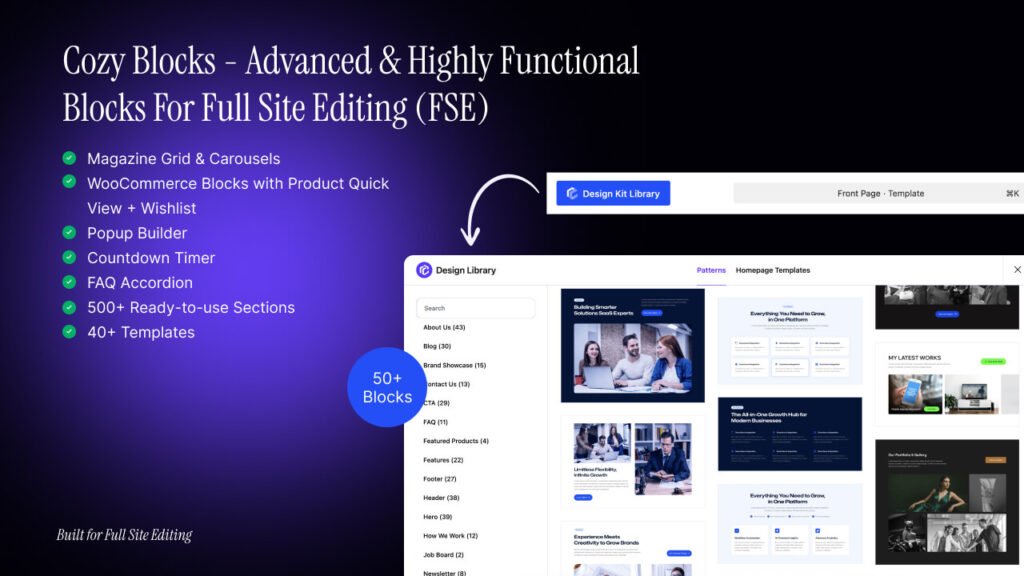
Cozy Blocks is a WordPress plugin for Full Site Editing (FSE) that adds 50+ advanced Gutenberg blocks, patterns, and homepage templates directly into the WordPress Site Editor. It’s built exclusively for block-based FSE themes, meaning it works natively inside the modern WordPress editing experience rather than bolting on a separate page-builder framework.
That’s an important distinction. Many popular page builder plugins for WordPress run as a layer on top of WordPress — adding their own editor, their own CSS framework, and their own performance overhead. Cozy Blocks instead extends the native Gutenberg and Site Editor experience, which means:
- No external page builder bloat
- Better speed and stability
- Native compatibility with block themes
- A more “WordPress-native” long-term workflow as FSE becomes the standard
Why Cozy Blocks Is Different From Generic Gutenberg Block Plugins
This is the core differentiator, and it’s worth spelling out clearly.
Generic Gutenberg block plugins — the Kadence Blocks, Spectra, Stackable, Otter-style tools — mostly focus on re-engineering WordPress core blocks: Heading, Column, Group, Button, Row. They give you more design controls (spacing, hover effects, gradients) on blocks you’d already have access to. Useful for design flexibility, but functionally, you’re not getting anything WordPress didn’t already offer in some form.
Cozy Blocks skips that layer entirely. Instead of rebuilding primitives, it ships purpose-built, problem-solving blocks — the kind of features that traditionally required a dedicated, single-purpose plugin or were hardcoded into a theme’s template files. That’s the real meaning of “highly functional blocks”: they solve a specific use case out of the box, not just “make a Heading look nicer.”
Here’s the side-by-side:
| Generic Block Plugins | Cozy Blocks | |
|---|---|---|
| Core focus | Rebuilding core blocks (Heading, Column, Group) | Solving real functional use cases (Magazine, WooCommerce, Popups, Countdown) |
| What it replaces | Mostly nothing — just styling on existing blocks | Often replaces the need for 3-4 separate plugins |
| Best for | General layout/design flexibility | Publishing sites, e-commerce stores, marketing-heavy pages |
| Compatibility | Broad — classic themes, page builders, FSE | Built specifically for FSE / block themes |
The Blocks That Make Cozy Blocks Stand Out
Cozy Blocks groups its 50+ blocks into five categories. Some overlap with generic plugins (accordions, counters, pricing tables are fairly standard now across the Gutenberg ecosystem). But a significant portion are genuine standouts — features you’d otherwise need a dedicated plugin for.
Layout & Structure Blocks
Includes the Cozy Container, Advanced Mega Menu, Advanced Tabs, Accordion, Sidebar Panel, Toggle Content, Back to Top, and Breadcrumbs.
The standout here is the Advanced Mega Menu — normally, multi-column mega menus require a dedicated navigation plugin or theme-level support. With Cozy Blocks, it’s a native Gutenberg block you can drop straight into the Site Editor’s navigation area.
Content & Marketing Blocks
Includes Slider, Advanced Gallery, Featured Content Box, Icon List, Icon Picker, Call to Action (CTA), Counter, Progress Bar, Pricing Table, Countdown Timer, and Popup Builder.
Two genuine differentiators here:
- Popup Builder — typically requires a separate popup plugin entirely (think OptinMonster or Popup Maker). Having it as a native Gutenberg block is a real time-saver for lead generation and promotions.
- Countdown Timer — built for urgency marketing (flash sales, launches), this is usually a standalone plugin in most WordPress setups.
3. Blog, Posts & Magazine Blocks
This is where Cozy Blocks truly separates itself from generic block plugins. It includes Post Grid/Carousel, Post Slider, Popular Post, Trending Post, Featured Post, Featured Post Tabs, Categorized Post Tabs, Magazine Grid, Magazine List, Related Post, News Ticker, Advanced Categories, Advertisement, Post Comments, and Post Views.
For anyone building a blog, news site, or digital magazine in WordPress, these blocks solve problems that are normally hardcoded into magazine themes:
- News Ticker — a scrolling headline ticker, almost always locked into a specific news theme’s header
- Trending Post / Popular Post — normally requires a separate post-tracking/analytics plugin
- Magazine Grid / Magazine List — flexible, dynamic post layouts without touching
functions.phpor template files - Post Views — a native view-counter block, typically only available via a stats plugin
- Advertisement Block — drop in ad scripts or clickable image ads without custom widget code
If you’re searching for WordPress magazine blocks, Gutenberg blocks for news websites, or how to build a magazine layout without a theme, this category is the answer.
4. WooCommerce Blocks
Includes Product Grid/Carousel, Product Category, Featured Product, Featured Products Tab, Add to Cart, All Product Reviews, Product Slider, Quick View, Wishlist, and Products Showcase Tabs.
This is the second major pillar of Cozy Blocks’ differentiation. Building a WooCommerce store with Gutenberg blocks normally means installing extra extensions for features like:
- Quick View — typically a paid extension (YITH WooCommerce Quick View, etc.)
- Wishlist — almost always a separate wishlist plugin
- All Product Reviews — usually a widget, not a flexible, placeable block
Cozy Blocks bundles these directly into the page-building workflow, meaning you can design a fully functional WooCommerce storefront entirely inside the WordPress Site Editor — no extra plugin stack required.
5. Team, Social & Utility Blocks
Includes Team, Testimonials, Social Icons, Social Shares, Portfolio Gallery, Before/After Image, Date & Time, Contact Form 7 Styler, and Cozy Button.
The standout here is Before/After Image — a comparison-slider feature that’s traditionally its own dedicated plugin category, now available as a native Gutenberg block.
Cozy Blocks vs. Generic Block Plugins: The Real Takeaway
The honest, accurate way to frame the comparison:
Cozy Blocks’ general design blocks (accordions, counters, tabs, pricing tables) are now table stakes — most modern Gutenberg plugins offer similar functionality. The real differentiation is concentrated in two verticals: publishing/magazine websites and WooCommerce stores, plus a handful of standalone utility wins (Popup Builder, Mega Menu, Before/After Image, Countdown Timer) that would otherwise require separate single-purpose plugins.
In other words: if you’re building a news site, blog, magazine, or online store on WordPress FSE, Cozy Blocks gives you native, functional blocks for problems that competitors leave you to solve with extra plugins or hardcoded theme templates. That’s a meaningful time, cost, and performance advantage — fewer plugins to install means fewer conflicts, less bloat, and faster page speed.
Who Should Use Cozy Blocks?
Cozy Blocks is the right fit if you’re:
- Building a WordPress blog, news site, or digital magazine and want dynamic post layouts (Magazine Grid, Trending Posts, News Ticker) without theme lock-in
- Launching a WooCommerce online store and want Quick View, Wishlist, and Product Showcase features natively, without a stack of extensions
- Already using (or open to using) a block-based FSE theme
- Looking to reduce plugin bloat by consolidating popups, countdown timers, and mega menus into one toolkit
It’s not the right fit if you’re running a classic (non-FSE) theme or rely on the Classic Editor, since Cozy Blocks is built exclusively for Full Site Editing.
Final Thoughts
The WordPress ecosystem is shifting toward Full Site Editing, and most Gutenberg block plugins haven’t caught up — they’re still just reskinning core blocks. Cozy Blocks takes the more useful path: building genuinely functional, problem-solving blocks for magazine publishing and WooCommerce e-commerce, the two areas where website owners most often need extra plugins just to get basic functionality.
If you’re building a content-heavy or store-driven website inside the WordPress Site Editor, Cozy Blocks is worth evaluating — not because it reinvents the Heading block, but because it hands you Magazine Grids, News Tickers, Popups, Quick View, and Wishlists as native, ready-to-use Gutenberg blocks from day one.