

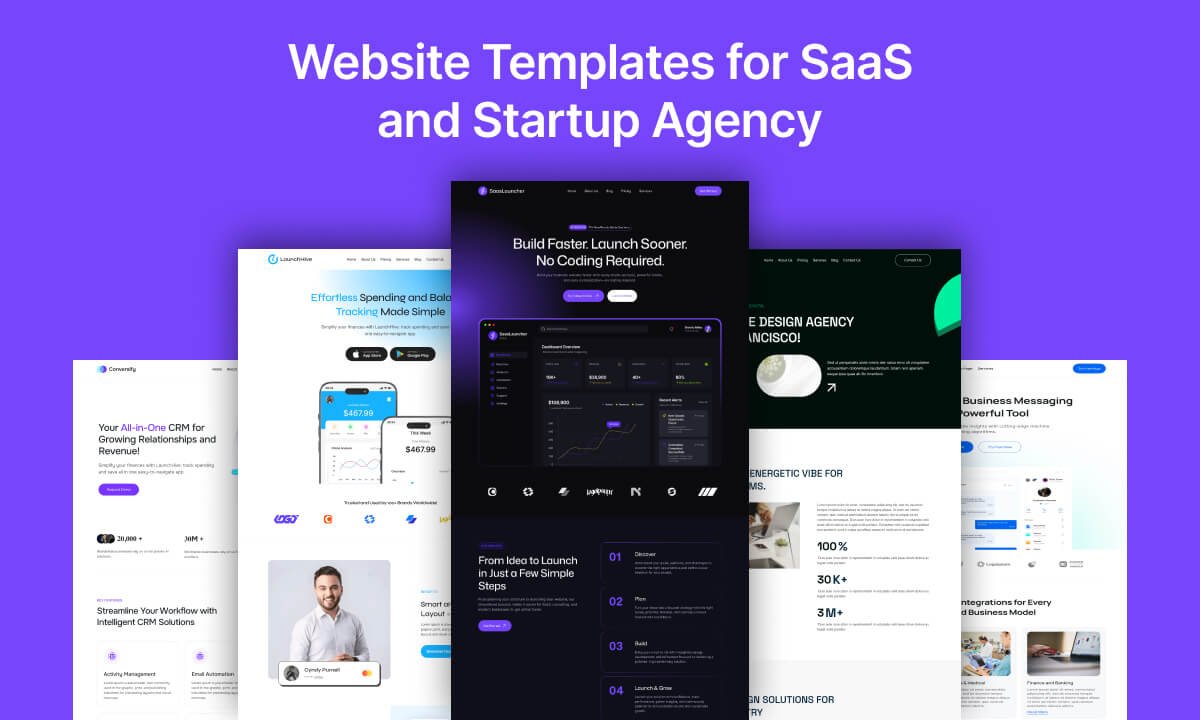
Launching a SaaS product takes more than building great software. Your website needs to explain what your product does, communicate its value quickly, build trust, and guide visitors toward an action—whether that is starting a free trial, booking a demo, signing up, or learning more.
That is where SaaS website templates can make a significant difference.
Instead of designing every page and section from scratch, a professionally designed SaaS website template gives you a proven starting point for building your online presence. You can begin with a ready-made layout, replace the demo content with your own, customize the branding, and launch much faster.
For businesses using WordPress, a dedicated SaaS WordPress theme can go even further by combining ready-made website designs with visual customization, reusable blocks, responsive layouts, and content management tools.
One example is SaasLauncher, a Full Site Editing WordPress theme from CozyThemes designed for SaaS businesses, startups, software companies, digital agencies, technology businesses, and modern service brands. It currently provides 50+ starter templates and 70+ ready-to-use website sections, with additional features and design resources available in the Pro version.
But what should you actually look for when choosing a SaaS website template?
Let’s explore the essential features, page sections, customization options, and practical considerations that can help you choose the right template for your business.
What Is a SaaS Website Template?
A SaaS website template is a pre-designed website layout created specifically for Software as a Service businesses.
Unlike a generic business template, a SaaS template typically includes sections designed around the SaaS customer journey, such as:
- Hero sections with clear value propositions
- Product and feature showcases
- Pricing tables
- Free-trial or demo CTAs
- Customer testimonials
- Logo and partner sections
- Integrations
- Benefits and use cases
- FAQ sections
- Team sections
- Blog and resource layouts
- Contact and lead-generation sections
The goal is not simply to make a SaaS website look modern. A good template should help communicate the product clearly and move visitors toward the next step.
For example, a SaaS homepage might follow a structure like:
Hero → Social Proof → Product Benefits → Features → How It Works → Integrations → Testimonials → Pricing → FAQ → Final CTA
This structure gives visitors the information they need while creating multiple opportunities to take action.
Why Use a SaaS Website Template?
Building a website from a blank page can take considerable time. You need to decide on the layout, typography, colors, content hierarchy, navigation, calls to action, and dozens of individual sections.
A ready-made SaaS website template reduces that initial design work.
1. Launch Faster
The biggest advantage is speed.
Instead of creating a homepage section by section, you can start with an existing website structure and customize it around your product.
For startups, this matters because your website should not become a bottleneck between building the product and taking it to market.
2. Start With a Professional Structure
A well-designed template gives you a logical content hierarchy from the beginning.
You can focus on your messaging rather than spending days deciding where every section should go.
3. Reduce Design and Development Costs
A SaaS website template can eliminate much of the initial design and development work required for a custom website.
This can be particularly useful for startups, founders, freelancers, and small SaaS teams that want a professional website without hiring a full design and development team.
4. Create Consistent Branding
The best templates are customizable.
You should be able to change colors, typography, images, spacing, layouts, headers, footers, and other visual elements so the final website feels like your brand rather than a copied demo.
5. Build More Than a Homepage
A SaaS business typically needs more than a landing page.
You may eventually need product pages, feature pages, pricing pages, case studies, documentation links, blog pages, contact pages, team pages, and other content.
A flexible template system makes it easier to expand your website as your business grows.
What Should a Good SaaS Website Template Include?
Not every template is equally useful. A visually impressive homepage is not enough.
When comparing SaaS website templates, look for the following essential elements.
1. A Clear SaaS Hero Section
The hero section is often the first thing visitors see.
It should communicate three things quickly:
What is the product? Who is it for? Why should someone care?
A strong SaaS hero commonly includes:
- A concise headline
- Supporting description
- Primary CTA
- Secondary CTA where appropriate
- Product screenshot or visual
- Trust indicator or social proof
For example, a SaaS product might use CTAs such as Start Free Trial, Book a Demo, Get Started, or See How It Works.
2. Product and Feature Sections
SaaS products can be difficult to explain because they often contain complex functionality.
Feature sections help break the product into understandable benefits.
Instead of simply listing technical features, use the template to communicate:
Feature → Benefit → Outcome
This makes the website more useful to both potential customers and search engines trying to understand the product.
3. Pricing Tables
Pricing is one of the most important sections for many SaaS websites.
A good SaaS website template should provide a clean way to present:
- Plans
- Monthly and annual pricing
- Included features
- Recommended plan
- CTA buttons
- Feature comparisons
For products with multiple plans, pricing tables can make the differences between options easier to understand.
4. Testimonials and Social Proof
Trust is particularly important when asking visitors to subscribe to software.
Include sections for:
- Customer testimonials
- Client logos
- Ratings
- Case studies
- User numbers
- Industry certifications
- Partner logos
Social proof helps answer one of the visitor’s most important questions:
“Can I trust this product?”
5. FAQ Sections
An FAQ section can reduce friction by answering common objections before a visitor contacts your sales team.
Common SaaS questions include:
- Is there a free trial?
- Do I need a credit card?
- Can I cancel anytime?
- Which integrations are supported?
- Is my data secure?
- Does it work with my existing tools?
- What support is available?
FAQ content can also make your website easier for AI search systems to understand because it provides direct question-and-answer relationships.
6. Strong Calls to Action
Every major section does not need a CTA, but your website should provide clear next steps.
Depending on your business model, these could include:
Start Free Trial → Book a Demo → Explore Features → See Pricing → Contact Sales
Your SaaS website template should make these CTAs visually clear and easy to customize.
SaaS Website Templates vs. SaaS Landing Page Templates
The terms SaaS website template and SaaS landing page template are sometimes used interchangeably, but they serve different purposes.
A SaaS landing page is generally focused on one specific conversion goal.
For example:
- Launching a new product
- Promoting a free trial
- Running a paid advertising campaign
- Announcing a new feature
- Collecting demo requests
A complete SaaS website is broader.
It may include:
- Homepage
- About
- Features
- Services
- Pricing
- Integrations
- Case studies
- Blog
- Resources
- FAQ
- Contact
If you are launching an entire SaaS brand, choose a template system that supports both SaaS landing pages and complete business websites.
That gives you flexibility as your product and marketing strategy evolve.
Why WordPress Is a Practical Choice for SaaS Websites
Many SaaS website templates are available as HTML, React, Next.js, or other development frameworks. These can be excellent choices for teams with developers.
However, not every SaaS founder wants to maintain a custom-coded marketing website.
WordPress provides an alternative.
With a modern SaaS WordPress theme, you can manage website content through WordPress while using visual editing tools to customize the design.
The WordPress Site Editor and Gutenberg have also made block-based website building significantly more flexible.
This makes WordPress particularly useful for:
- SaaS startups
- Small software companies
- Agencies
- Consultants
- Technology businesses
- AI product websites
- Digital products
- Software companies
- Service businesses
The important distinction is that your SaaS application and your marketing website do not necessarily need to use the same technology.
Your product can run on your preferred technology stack while WordPress powers the public-facing marketing website.
SaasLauncher: A SaaS WordPress Theme Built for Faster Launches
If you are looking for a SaaS WordPress theme that combines ready-made designs with WordPress’s native block-based editing experience, SaasLauncher is worth considering.
SaasLauncher is a modern Full Site Editing theme designed for SaaS businesses, startups, software companies, agencies, technology companies, consultants, and other modern businesses. It is built around the WordPress Site Editor and Gutenberg, allowing users to customize their website without relying on traditional page builders or extensive coding.
The current theme includes 50+ professionally designed starter templates and 70+ ready-to-use website sections. These layouts cover common website requirements including homepages, SaaS landing pages, product showcases, pricing sections, testimonials, team pages, portfolios, FAQs, lead-generation sections, and more.
Explore SaasLauncher WordPress Theme
Built With Full Site Editing
SaasLauncher uses WordPress Full Site Editing, giving you control over major parts of the website through the Site Editor.
You can customize:
- Headers
- Footers
- Templates
- Pages
- Colors
- Typography
- Layouts
- Global styles
That means you are not restricted to editing only the content inside a predefined page.
Ready-Made Website Templates
Starting from a blank canvas can slow down a SaaS launch.
SaasLauncher provides ready-made starter designs so you can select a suitable starting point, import the design, replace the demo content, and customize it around your brand.
The available designs are not limited to SaaS. The theme also supports startups, agencies, businesses, software companies, and other modern online businesses.
Product, Pricing, Services, and Conversion Sections
A SaaS website needs to explain a product and encourage visitors to take action.
SaasLauncher includes layouts for product and feature showcases, pricing tables, testimonials, portfolios and case studies, team sections, FAQs, blogs, brand showcases, contact sections, and CTAs.
This gives you the building blocks needed to create both a SaaS homepage and supporting marketing pages.
Extend Gutenberg With Cozy Blocks
SaasLauncher is also designed to work with Cozy Blocks, extending the WordPress block editor with additional blocks and content-building functionality.
The WordPress.org listing currently describes SaasLauncher as powered by Cozy Blocks with 50+ advanced blocks.
For users who want additional design resources, the Pro version adds more templates, sections, interactive content blocks, popup functionality, advanced pricing layouts, sliders, portfolios, team and testimonial layouts, mega menus, and WooCommerce tools.
How to Choose the Best SaaS Website Template
Before choosing a template, ask these five questions.
Does it match your SaaS business?
A template designed for a SaaS product will usually give you a better starting point than a generic corporate template.
Look for layouts that support your product type, whether you are building:
- AI software
- CRM software
- Project management software
- Fintech software
- Marketing software
- Analytics platforms
- Productivity tools
- Mobile applications
- Developer tools
- Enterprise SaaS
Can you customize it easily?
A beautiful demo is only useful if you can make it yours.
Check whether you can change typography, colors, spacing, images, navigation, headers, footers, and layouts.
Does it support conversion-focused sections?
Your website should be designed around business goals, not only aesthetics.
Look for templates with pricing, testimonials, product showcases, lead-generation sections, FAQs, and strong CTAs.
Can you expand it later?
Your first website may only need a homepage and pricing page.
Six months later, you may need a blog, resources, case studies, landing pages, or new product pages.
Choose a flexible template that can grow with you.
Is the platform easy to manage?
If your marketing team needs to update the website regularly, ease of use matters.
A WordPress block theme can be a strong option for teams that want visual editing without depending heavily on developers for everyday content changes.
A High-Converting SaaS Website Structure
If you are starting from scratch, this is a practical structure for a SaaS homepage:
1. Hero
Explain the product and primary benefit immediately.
2. Social Proof
Show customer logos, user numbers, ratings, or other trust signals.
3. Product Overview
Explain what the product does.
4. Key Benefits
Focus on outcomes rather than only features.
5. Feature Showcase
Explain the most valuable capabilities.
6. How It Works
Make the product easy to understand.
7. Integrations or Use Cases
Show how the product fits into the customer’s workflow.
8. Testimonials
Build credibility with real customer experiences.
9. Pricing
Make plans and differences easy to compare.
10. FAQ
Address common objections and questions.
11. Final CTA
Give visitors one clear next step.
This structure works because it follows a natural decision-making journey: understand → trust → evaluate → act.
SaaS Website Template FAQs
The best SaaS website template depends on your platform, product, customization requirements, and budget. For WordPress users, look for a SaaS-specific theme with ready-made templates, conversion-focused sections, visual editing, responsive design, and room to expand.
SaasLauncher is one option for WordPress users because it combines Full Site Editing with 50+ starter templates and 70+ ready-to-use sections.
A SaaS website should typically include a clear homepage, product or feature sections, benefits, pricing, testimonials, social proof, FAQs, CTAs, contact information, and supporting pages such as About, Blog, Integrations, or Case Studies where relevant.
Yes. A SaaS WordPress theme can be particularly useful for startups that need to launch a professional marketing website quickly and want to update content without extensive coding.
A SaaS theme generally provides the broader design system and functionality for an entire WordPress website, while a template usually refers to a specific page or complete starter design. A theme such as SaasLauncher can provide both the overall framework and ready-made website designs.
Yes. WordPress can be used to build SaaS landing pages for product launches, free trials, demo requests, campaigns, and feature promotions. A block-based SaaS WordPress theme makes it easier to create and customize these pages visually.
Not every SaaS business needs a public pricing page. If your pricing is transparent and standardized, a dedicated pricing page can make evaluation easier. Enterprise SaaS businesses with custom pricing may instead use pricing ranges and a Book a Demo or Contact Sales CTA.
A good SaaS website template should be customizable. Ideally, you should be able to change the content, typography, colors, images, layouts, navigation, headers, and footers without rebuilding the website from scratch.
Build Your SaaS Website Without Starting From Zero
Your SaaS website should help explain your product—not become another product you have to build from scratch.
The right SaaS website template gives you a head start with professional layouts, conversion-focused sections, clear content structures, and the flexibility to build around your brand.
For WordPress users, a modern block-based theme can make the process even simpler by combining ready-made designs with visual editing and full control over the website.
SaasLauncher brings these ideas together with Full Site Editing, ready-made starter websites, reusable sections, product and pricing layouts, testimonials, FAQs, CTAs, and additional tools for building a complete SaaS or business website.
Whether you are launching an AI product, software platform, startup, digital agency, or technology business, starting with a strong foundation can help you move from blank page to launch-ready website much faster.
Get Started With SaasLauncher
Leave a Reply